
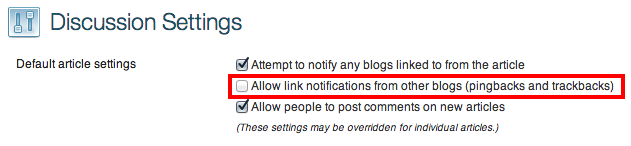
It’s more widespread than I thought. Please check first if your posts allow pingbacks before you complain to WordPress. Here’s how:
Thank you to Chris, The Story Reading Ape, for the visual: https://thestoryreadingapeblog.com/2016/04/13/experiencing-problems-with-pingbacks-on-your-wordpress-blog-then-please-read-this/
If you’ve checked the above settings and your pingbacks still aren’t working, please let WordPress know.
Remember – it might only be your incoming pingbacks. If you’re expecting some, like I do with my prompts, you’ll know. If you’re not expecting any, ask a friend to try linking to one of your posts to see if you get a notification. If I get time later, I’ll help you. Please let me know in the comments.
Got all that? Great! Please click on the original post to read Hugh’s thoughts on the matter!

Pingbacks have not been working on my blog since 8th April 2106. I’ve read a few posts from other bloggers experiencing the same problem.
I contacted WordPress today as I thought it rather strange that they were still not working. I thought the problem was affecting all WordPress sites, but it seems not. They’ve now added my blog to a list of other blogs experiencing the same problem.
They have staff looking into the problem. In the meantime, if you are participating in one of my weekly photo challenges then I recommend that you copy and paste the link to your post in the comments section of my post. I’m also not being notified of any links or Pingbacks other bloggers may be making to any of my posts.
Given that WordPress were not aware that my blog was affected by this problem, I would recommend that if you are experiencing the…
View original post 118 more words


April 15, 2016 at 3:34 am
Pingbacks still not working.
That’s not the only weird WP glitch at the moment; when I share posts to my blog Facebook page, they get posted with incorrect, totally random thumbnails, sometimes from completely different posts, even if I assign a featured image to them.
LikeLike
April 13, 2016 at 1:16 pm
Your post pingback works OK Linda – and it brought me to the relevant post – HOWEVER – the strange thing is that the pingback actually appears under another post LOLOL – it’s in the comments at:
https://thestoryreadingapeblog.com/2016/04/13/just-an-odd-job-girl-serialisation-chapter-six-hot-footing-it-up-escalators/
LikeLike
April 13, 2016 at 12:52 pm
Thanks for the info … some have mentioned this to me.
Question: where did your reblog button go? I’d like to reblog this. Thx .. 🙂
LikeLike
April 13, 2016 at 12:53 pm
I found out this morning that you can’t re-blog a reblog. You’ll have to go to Hugh’s original post and reblog that. 😛
LikeLiked by 1 person
April 13, 2016 at 12:55 pm
Oh …. ok … I knew that. Reason I asked is bc I’d lost some other “reblog buttons” in other posts. TY!!! 🙂
LikeLike
April 13, 2016 at 12:46 pm
Thanks for sharing, Linda.
LikeLike
April 13, 2016 at 12:48 pm
It’s actually good to know I’m not alone – when I first contacted them on Monday, they told me it was only me.
LikeLike
April 13, 2016 at 12:55 pm
That’s so unfair. I must admit that when I first contacted them and asked how sorting out the Pingback problem affecting all WordPress blogs was going, they were rather at a loss as to what I was referring to. He said he knew nothing of any Pingback problems and then asked me for examples which I sent him. That’s when I found out it was not affecting everybody and he said it was not a site problem but was only affecting some blogs. They had no idea my blog was affected.
LikeLiked by 1 person